
Discover how free tool websites make money through ads, subscriptions, and affiliate marketing.
What if you could build a website that offers a simple tool for free and still generate revenue from thousands or even millions of visitors? It might sound surprising, but this business model already works across the internet.
Websites offering online calculators, image editors, video utilities, and AI-powered tools attract people who want to solve specific problems quickly. Some of these websites generate substantial revenue by allowing visitors to use their tools without paying anything.
The underlying idea is straightforward: give people something useful for free, attract relevant traffic, and earn money through advertising or other monetization methods.
You do not necessarily need to build a complicated application to explore this business model. A small, well-designed tool that solves a genuine problem can be a starting point.
However, success depends on more than building a tool and putting advertisements on a webpage. You also need to understand your audience, attract visitors, provide a good user experience, and choose an appropriate monetization strategy.
Let’s explore how free tool websites make money, examine seven examples, and discover how beginners can develop their own ideas.
Disclaimer: Some of the links in this article are affiliate links. If you click on the link and purchase the item, I may earn a commission at no extra cost to you.
Table of Contents
ToggleWhat Is a Free Tool Website?
A free tool website provides an online utility that visitors can use without purchasing a product or paying a subscription.
For example, someone who wants to calculate a percentage can use an online percentage calculator. A content creator might need to download a YouTube or an Instagram thumbnail.
Instead of installing software or purchasing an application, the visitor opens a website and completes the task directly in their browser.
Other examples include:
- Word and character counters
- Image compressors
- PDF utilities
- Currency converters
- Password generators
- Website performance checkers
- AI writing assistants
- Online calculators
- Image resizing tools
- File format converters
These tools vary considerably in complexity. A percentage calculator may require only a few mathematical formulas, whereas an online image editor or AI-powered application can require substantial development work, computing resources, and ongoing maintenance.
The important point is that a tool does not have to be complicated to be useful. It needs to solve a problem that people actually have.
How Free Tool Websites Make Money?
If visitors do not pay to use a tool, where does the revenue come from?
There are several possible answers. The best approach depends on the type of tool, the audience it attracts, and the resources required to operate it.
1. Display Advertising
Display advertising is one of the most straightforward monetization methods.
A website owner joins an advertising network, places the required advertising code on the website, and allows the network to display advertisements to visitors.
Depending on the network and payment model, the publisher may earn money from ad impressions, clicks, or other qualifying activity.
For example, a free calculator website might display advertisements around its calculator. Visitors can continue using the calculator without paying, while the website earns advertising revenue.
Google AdSense is one example of an advertising network that helps eligible website publishers monetize their content.
However, approval is not automatic. Websites must satisfy the relevant network’s policies and eligibility requirements.
The basic principle: more valuable advertising impressions can create more revenue, provided the website attracts sufficient traffic and complies with advertising policies.
2. Premium Subscriptions
Some websites offer a free version of a tool alongside a paid version with additional features.
This is commonly called the freemium model.
A freemium model combines:
- Free: Users can access basic features without payment.
- Premium: Users pay for additional or advanced features.
The word Freemium combines Free + Premium.
For example, an AI text analysis tool might allow visitors to perform a limited number of checks for free. Users who need more checks, larger usage limits, advanced reports, or additional features can purchase a subscription.
This approach allows people to experience the product before deciding whether it is worth paying for.
Premium subscriptions can be particularly useful when a tool solves a recurring problem for professionals, businesses, students, or content creators.
The challenge is that the paid version must provide enough additional value to justify its price.
3. Affiliate Marketing
A free tool website can also recommend relevant products and services through affiliate links.
When a visitor clicks an affiliate link and completes a qualifying purchase or action, the website owner may earn a commission.
For example, a website offering image editing utilities could recommend suitable design software. A website providing SEO tools might recommend keyword research platforms or website hosting services.
The recommendations should be closely related to the tool’s purpose. Irrelevant promotions can undermine trust and make the website less useful.
Affiliate disclosures are also important. Visitors should be informed when the website may earn a commission from qualifying purchases.
4. Paid Features and One-Time Purchases
Not every tool needs a monthly subscription.
Some websites charge a one-time fee for an individual feature, a downloadable file, an advanced report, or a particular processing task.
For example, a free image utility might allow basic resizing while charging for bulk processing or additional export options.
This model can work when users need an advanced feature occasionally but do not want another recurring subscription.
5. Business and API Plans
Some tools attract developers and businesses that need to use a service repeatedly or integrate it into their own applications.
A website might provide a free interface for occasional users while offering paid API access, higher usage limits, or business plans to customers with larger requirements.
This model is more technically demanding, but it can be appropriate for tools that provide reliable data processing, automation, or specialized functionality.
Five Free Tool Website Examples
The following examples illustrate different ways a free tool website can attract visitors and generate revenue.
Note: The traffic and revenue figures are illustrative estimates reported in third-party traffic analyses or publicly discussed business figures, not audited financial statements. They may have changed, and actual earnings can differ substantially.

ZeroGPT is an example of a tool that addresses a need arising from the growing use of artificial intelligence.
Users submit text for analysis, and the service attempts to estimate whether the text may have been generated by AI.
Tools of this kind can attract students, educators, editors, content publishers, and other people interested in examining written material.
A website may combine free checks with paid subscriptions that offer additional usage or features. Advertising can provide another potential source of revenue.
However, AI detection is not perfectly reliable. Human-written text can be incorrectly flagged, and AI-generated text can go undetected. Results should therefore be treated as estimates rather than definitive proof of authorship or misconduct.
Developing this type of tool can also be more challenging than creating a basic calculator because it may require specialized models, computing resources, and continuous evaluation.
Business lesson: Tools that address emerging needs can create opportunities, but reliability and honest communication are essential to long-term trust.

PercentageCalculator.net is a classic utility website.
People regularly need to calculate percentages for discounts, price changes, marks, business figures, and other everyday situations.
A simple calculator can help visitors complete these tasks without opening a spreadsheet or performing the calculations manually.
For example, if a product costs $80 and its price is reduced by 25%, a percentage calculator can help determine the discount and final price.
The tool itself may be relatively simple to build. Attracting visitors is often the more difficult part.
A website can support the calculator with useful explanations, worked examples, and related calculations. These additions can help visitors understand the results and discover other relevant tools.
Display advertising may generate revenue when the site attracts sufficient qualifying traffic.
Business lesson: Everyday problems can create opportunities for simple, practical online utilities.

Photopea demonstrates a more advanced version of the free tool business model.
It provides an image editing application that runs in a web browser and supports a range of common editing tasks. This makes it useful for people who want image editing capabilities without necessarily installing desktop software.
Potential users include graphic designers, students, bloggers, social media managers, and small business owners.
A sophisticated tool can attract repeat visitors because people may return whenever they need to edit images.
Photopea has publicly been associated with an advertising-supported business model. Historical earnings claims should not be assumed to reflect its current monthly income.
Building an application of this complexity requires considerably more work than creating a basic calculator. Developers must consider image processing, file compatibility, performance, interface design, security, and ongoing updates.
Business lesson: A free tool can become a substantial product when it offers meaningful functionality and serves users’ recurring needs.

A YouTube thumbnail downloader helps visitors retrieve a thumbnail associated with a YouTube video.
The visitor provides a video URL, and the website displays or retrieves an available thumbnail image. This can be useful for researchers, designers, publishers, and content creators who need to inspect or reference video thumbnails.
The tool has a relatively narrow purpose, which can make its functionality easier to explain than that of a large software application.
A website may earn money through display advertising if its traffic and advertising setup support the model. Nevertheless, a simple tool can still face competition from similar websites and direct methods of accessing publicly available thumbnail images.
Any implementation should comply with relevant platform terms and respect copyright and other applicable restrictions.
Business lesson: A tool that performs one task efficiently can attract visitors searching for that exact solution.
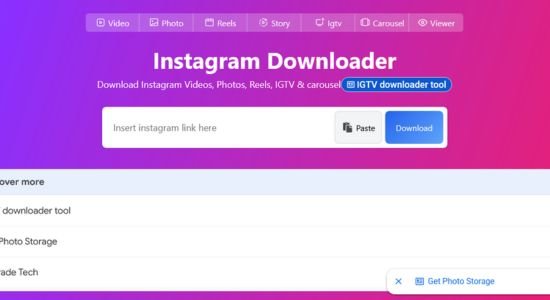
FastDL is a website that helps users download Instagram videos through a simple online interface.
The concept is easy to understand. A visitor provides a supported Instagram link, and the service attempts to retrieve the associated video.
The business opportunity comes from the demand for a quick, convenient solution. People searching for a particular utility may visit a dedicated website rather than install a separate application.
A website of this type can potentially earn revenue through display advertising if it attracts substantial traffic and qualifies for an advertising network.
Its simplicity, however, should not be confused with guaranteed success. Competition, search engine rankings, technical reliability, platform restrictions, and intellectual property considerations all matter.
Anyone considering a similar service should respect the relevant platform’s terms, copyright rules, and privacy requirements rather than assuming every piece of online content can be downloaded or redistributed.
Business lesson: A narrowly focused tool can serve a large audience when it solves a clearly defined problem.
How Much Money Can a Free Tool Website Make?
The earning potential depends on several variables, including traffic volume, page views, visitor location, advertising rates, operating expenses, and the monetization model.
Consider a hypothetical website that receives 100,000 page views per month.
If its effective advertising revenue is $3 per 1,000 page views, its estimated monthly advertising revenue would be:
100,000 ÷ 1,000 × $3 = $300 per month.
Now imagine a website that receives 1 million page views per month at the same rate.
1,000,000 ÷ 1,000 × $3 = $3,000 per month.
These examples illustrate how traffic can affect advertising revenue. They are not promises of earnings.
The following table shows how different page-view volumes translate into illustrative monthly advertising revenue at several assumed RPMs:
Monthly page views | $2 RPM | $5 RPM | $10 RPM |
10,000 | $20 | $50 | $100 |
100,000 | $200 | $500 | $1,000 |
500,000 | $1,000 | $2,500 | $5,000 |
1,000,000 | $2,000 | $5,000 | $10,000 |
RPM means revenue per thousand page views in this example. Actual advertising networks may calculate and report RPM differently, so you should use the appropriate metric when estimating your own results.
A website serving visitors primarily in lower-advertising-rate markets may earn less per page view than one attracting audiences in higher-value markets.
However, geography is only one factor; subject matter, seasonality, ad placement, visitor engagement, and advertiser demand also influence revenue. It is also important to distinguish revenue from profit.
A tool that processes images or runs AI models may incur hosting, computing, development, maintenance, and support costs. A website earning $5,000 per month is not necessarily keeping the entire amount.
How to Find a Free Tool Website Idea
You do not need to invent a completely new category of software. A more practical approach is to identify an existing problem and find a way to solve it better for a particular audience.
Here is a beginner-friendly process.
Step 1: Identify Repetitive Problems
Pay attention to small tasks that people repeatedly perform while studying, working, shopping, creating content, or managing a business.
Ask yourself:
- What do people calculate frequently?
- Which tasks require unnecessary steps?
- What do people repeatedly search for online?
- Which software features are too expensive or complicated for beginners?
- What information would be easier to access through a simple tool?
Write down every promising idea rather than trying to select a winner immediately.
Step 2: Choose a Specific Audience
A general-purpose tool may face strong competition. A tool designed for a particular audience can sometimes offer a clearer value proposition.
For example, instead of building another generic calculator, you could investigate whether bloggers need a specialized affiliate commission calculator.
Similarly, a tool designed to help small website owners check image dimensions or estimate email campaign performance might serve a defined group of users.
A narrower audience does not automatically guarantee success, but it can help you identify relevant problems and build a more focused product.
Step 3: Research Search Demand
Before investing time in development, investigate whether people search for solutions to the problem.
You can begin with Google search suggestions, related search terms, competitor websites, and Google Trends. Keyword research tools can help you examine search demand and competition more systematically.
Look for queries that indicate a clear need, such as:
- Online affiliate commission calculator
- Image compressor for websites
- Blog title character counter
- Email subject line length checker
- Website image size checker
These are ideas to investigate, not claims that the keywords have high search volume or low competition.
Examine the pages already ranking for your target searches. Ask whether you can create a tool that is easier to use, more accurate, more accessible, or more relevant to a particular audience.
Step 4: Check the Competition
Search for existing tools that perform the same task.
Test several of them and identify their strengths and weaknesses. Perhaps they load slowly, display confusing results, lack mobile support, or fail to explain how calculations work.
Do not assume that an existing competitor leaves an easy opportunity. A successful website may have years of accumulated authority, brand recognition, backlinks, and returning users.
Your goal should be to find a genuine improvement or a specific underserved audience rather than merely reproducing an established website.
Step 5: Build the Simplest Useful Version
Once you have validated the problem, build a basic version of the tool.
For a simple calculator, you might need only a form, a calculation, and a results section. More advanced applications may require a developer, an API, a database, or specialized infrastructure.
AI coding assistants can help beginners understand programming concepts, create prototypes, and troubleshoot code. However, AI-generated code still needs testing and review, particularly when it processes user data, handles files, or performs security-sensitive operations.
Start with the smallest version that solves the problem correctly. Add more features after you have evidence that people find the tool useful.
Step 6: Make the Website Easy to Use
A good tool should help visitors complete their tasks with minimal friction.
Consider the following essentials:
- A clear explanation of what the tool does
- Simple instructions
- Accurate and understandable results
- A mobile-friendly interface
- Fast loading times
- Accessible controls and readable text
- Appropriate privacy and security protections
- Helpful error messages
Avoid forcing visitors to create an account or navigate through unnecessary pages when the tool can reasonably work without those steps.
If you collect or process user information, explain your data practices clearly and protect that information appropriately.
Step 7: Attract Visitors Through SEO
Search engine optimization can help people discover your tool when they search for a solution.
Begin with a descriptive page title, a clear heading, and a short explanation of the tool’s purpose. Use the language people naturally use when searching for that type of utility. You can also create genuinely useful supporting content.
For example, an affiliate commission calculator could be supported by articles explaining how affiliate commissions work, how to calculate conversion rates, and how to estimate potential earnings.
These articles should answer real questions rather than exist solely to repeat keywords.
Ensure that search engines can access the page, that the tool works correctly, and that the website offers a useful experience. Rankings are never guaranteed, and a technically sound website may still need time to attract organic traffic.
Step 8: Choose a Monetization Method
Do not rush to place advertisements everywhere before you understand your audience.
First, determine how the tool will create value and whether visitors are likely to return.
Then consider the options:
- Display ads: Suitable for some tools with substantial traffic and sufficient page views.
- Affiliate marketing: Useful when visitors may genuinely benefit from relevant products or services.
- Premium features: Appropriate when users need advanced functionality or higher usage limits.
- Subscriptions: Worth exploring when the tool solves an ongoing problem.
- Business plans: Potentially suitable for tools serving professional users or organizations.
A website can combine several methods, but each should support the user experience rather than interfere with it.
Step 9: Measure Results and Improve
After launching, monitor how people discover and use the tool.
Google Search Console can help you understand search impressions, clicks, and queries. Analytics software can provide additional information about user behavior, while advertising dashboards can show monetization performance where applicable.
Pay attention to questions such as:
- Which search queries bring visitors?
- Are users completing the intended task?
- Which pages attract the most relevant traffic?
- Do visitors return?
- Are advertisements affecting usability?
- Which improvements could make the tool more useful?
Use this information to prioritize changes. A smaller tool that reliably solves a real problem may be a better long-term business than a larger application that attracts visitors but fails to retain them.
Five Free Tool Website Ideas for Beginners
If you want to explore this business model, consider starting with ideas that match your knowledge, resources, and intended audience.
1. Affiliate Commission Calculator
An affiliate commission calculator could help publishers estimate earnings based on clicks, conversion rates, and commission amounts.
For example, a user could enter 1,000 clicks, a 3% conversion rate, and a $20 commission to estimate potential revenue.
Beginner-friendly articles about affiliate marketing, conversion rates, and website monetization could support this tool.
2. SEO Title and Meta Description Checker
A simple utility could help bloggers count title and meta description characters, identify missing fields, and preview how a search result might appear.
A more advanced version could add more checks, but it should not promise that a specific character count guarantees full display in search results.
This idea could complement a website publishing practical SEO guidance.
3. Blog Post Reading Time Calculator
A reading time calculator estimates how long an article might take to read based on its word count and an assumed reading speed.
It could serve bloggers, editors, publishers, and content creators.
A basic version would be relatively straightforward to build, although competing tools already exist.
4. Email Campaign Metrics Calculator
An email marketing calculator could help users estimate open rates, click-through rates, conversion rates, and campaign revenue from their own figures.
For example, a user could enter the number of emails delivered and the number of clicks to calculate the click-through rate using a clearly defined formula.
The tool could be supported by educational content about email marketing and campaign analysis.
5. Website Image Size Checker
A website image utility could help users inspect image dimensions, identify large files, or estimate potential savings from image compression.
A basic checker may be simpler to develop than a full image editor, although more advanced file processing requires additional technical work.
The tool could serve bloggers, website owners, and small businesses looking to improve website performance.
These five ideas are starting points for research, not guaranteed business opportunities. Before building one, investigate its competition, target audience, technical requirements, and potential demand.
Common Mistakes to Avoid
Free tool websites can look attractive as a business model, but several mistakes can make them difficult to sustain.
Copying an established competitor: A familiar concept is not necessarily a viable opportunity. Existing websites may have strong rankings, loyal users, and substantial technical resources. Look for a specific problem you can solve better.
Choosing an idea without researching demand: A tool may be easy to build but attract very few visitors. Validate the need before investing heavily.
Expecting instant search traffic: A new website may take considerable time to earn visibility. SEO requires useful content, sound technical implementation, and continued improvement.
Assuming traffic automatically means profit: Revenue depends on monetization, while operating expenses determine how much money remains.
Overloading the interface with advertisements: Excessive advertising can frustrate visitors and interfere with the task they came to complete. A sustainable website needs to balance revenue with usability.
Ignoring legal and technical requirements: File handling, privacy, copyright, platform terms, security, and third-party API restrictions can all affect whether a tool is appropriate and viable.
Building too many features too early: A complicated product can consume time and money before you know whether anyone wants it. Start small and expand based on evidence.
Concluding Remarks
Free tool websites demonstrate that an online business does not always need to sell a product directly to every visitor.
A useful tool can attract an audience, and that audience may support advertising, affiliate marketing, subscriptions, or paid features. In some cases, a simple utility can become part of a much larger online business.
However, the most important lesson is not that every free tool can generate thousands of dollars. It is that solving a specific problem for a clearly defined audience can create a foundation for a business.
If you are a beginner, start by observing the small problems people encounter in their daily work. Research whether people are looking for solutions, examine existing alternatives, and identify an improvement you can realistically deliver.
Build a simple version, make it genuinely useful, and learn from the people who use it.
The opportunity is not necessarily to create the next enormous online tool. It may be to build a small, reliable utility that serves a specific audience well and grows into a sustainable business over time.
Read More:
Image Source Acknowledgement: Unsplash